Waiting around for a key network server, Switch or Router to fail is not a good way to maintain your network uptime and key resources online – For this reason alone, you need a Robust LAN Monitoring Software that will help you Prevent downtime before it occurs!
With the right set of software and tools at your disposal, you will quickly take back control of your organization’s operating environment, and all of the detail you could possibly need will soon be at your fingertips.
Here is our list of the best LAN monitoring tools:
- ManageEngine OpManager – EDITOR’S CHOICE A monitoring system that can run on local Windows Server or Linux hosts, or in AWS and Azure, while combining network device supervision with server monitoring. Access a 30-day free trial.
- Paessler PRTG – FREE TRIAL excels in providing an integrated monitoring solution with dynamic adaptation to IT environments. Start a 30-day free trial.
- Site24x7 – FREE TRIAL A hosted platform that includes LAN monitoring within a broader full-stack monitoring environment. Start a 30-day free trial.
- ManageEngine OpManager Nexus – FREE TRIAL A comprehensive monitoring tool that supports proactive monitoring to reduce downtime. Start a 30-day free trial.
- SolarWinds Network Performance Monitor Stands out for its automated network discovery, intuitive web interface, and comprehensive monitoring tools.
Perhaps your SFTP Server Hard drive or File Server is running out of space, or your terminal server is running dangerously low on system memory: LAN monitoring can definitely help.
Whether you need graphical insight into what is going on in your operating environment, or automated warnings and alerts when something is about to go wrong, there are a wide variety of tools on the market that will help you to get the job done effectively and efficiently.
We will be looking at the best such tools for keeping an eye on your internal network, and what some of the most important features of each one is.
The Best LAN Monitoring Tools
Our methodology for selecting the best LAN Monitoring tools:
We've broken down our analysis for you based on these key criteria:
- Network discovery and monitoring efficiency
- User interface intuitiveness and ease of use
- Customization and alert system capabilities
- Pricing and value for money
1. ManageEngine OpManager – FREE TRIAL
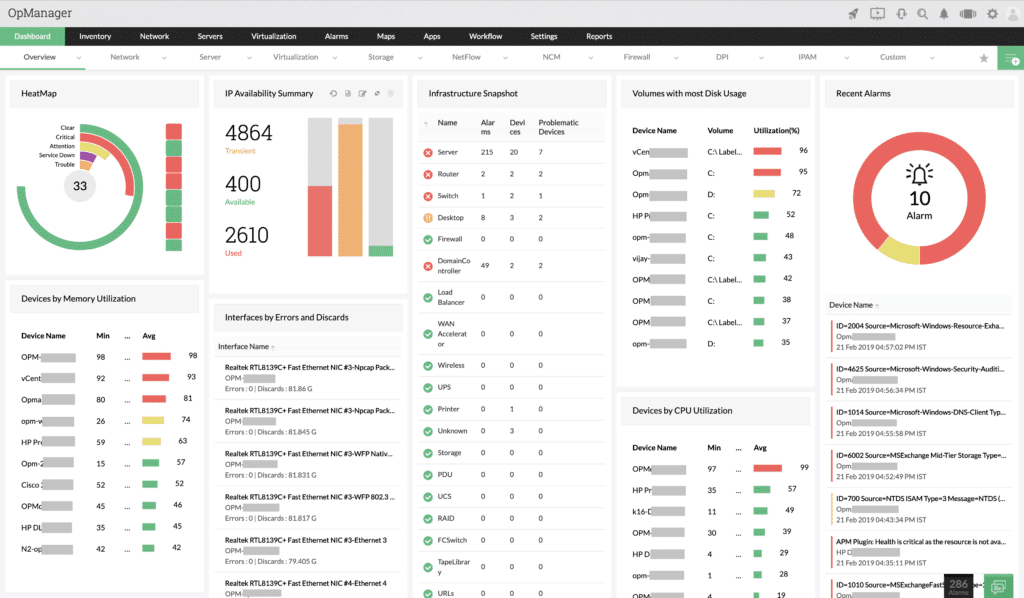
ManageEngine have created a tool that allows you to easily manage your LAN and devices on your LAN: OpManager. Its primary function is that of an infrastructure management tool, and as such will provide you with all of the network information that you could possibly need to maintain and manage your network.
Key Features:
- Efficient device discovery
- Integrated API for software compatibility
- Detailed resource monitoring
- SNMP-based device monitoring
- Network troubleshooting tools
- SNMP-based device monitoring
- Network troubleshooting tools
The application allows administrators to see data on the network such as server resource allocations, network performance, and application behavior, and is all accessible from a web based feature that provides a search function for finding specific errors and warnings. From here you can also manage your alerts and fine tune your setup.
Why do we recommend it?
ManageEngine OpManager is recommended for its effective network management and detailed monitoring capabilities.
OpManager has an API that allows it to integrate with other software packages such as Helpdesk and other ManageEngine products, allowing data to flow to and from all of your supported applications. This allows your alerts and triggers from failed devices on your network to log support tickets, send emails, send messages and alert your IT staff about any potential problems.
Because this software is designed to help prevent downtime, these messages will often warn you way in advance about any potential problems. Device discovery works flawlessly once the software has been installed.
Simply specify the IP ranges that you wish to scan and then sit back while all of the devices are added to your inventory. Once all of your devices have been added, you will have access to them via the web interface, which specifies important information such as server utilization in both CPU, and RAM, and for critical issues such as hard drive space and network activity.
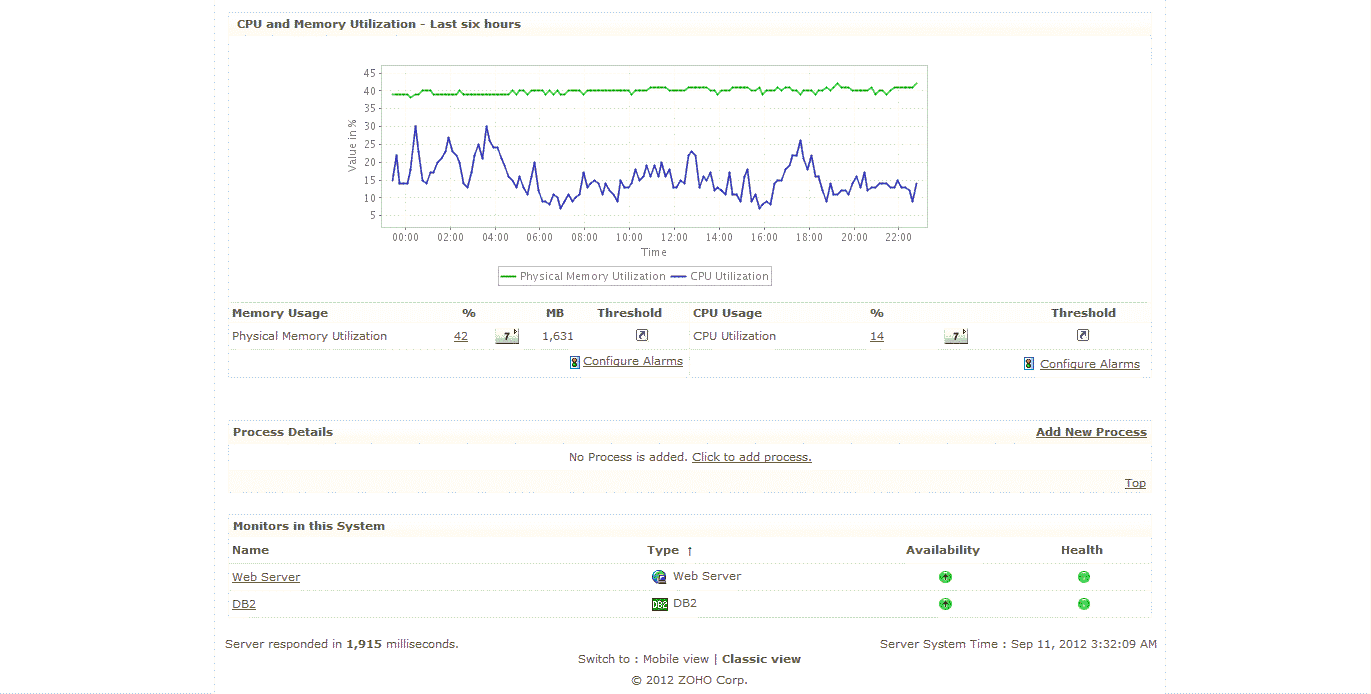
This console acts as a centralized dashboard that is easy to navigate. When an issue occurs, simply highlight the device and drill down into more detail to see exactly what is happening on your network.
Who is it recommended for?
Ideal for IT administrators looking for a comprehensive tool to manage and monitor LAN infrastructure with proactive alerting.
Pros:
- Can monitor bandwidth consumption as well as alert to configuration changes that could impact network performance
- Can monitor bandwidth and resource consumption on the application level, and even drill down to identify specific users consuming the most resources
- Supports email, SMS, and webhook for numerous alerting channels
- Integrates well in the ManageEngine ecosystem with their other products
- Server monitoring
Cons:
- Takes time to full explore all the options available in the ManageEngine software suite
Price: Pricing starts at $945 for 100 sensors, and if you need more information, or have a bigger environment, then you can request a personalized quote. You can also download the software on a 30-day free trial to work out your requirements.
EDITOR'S CHOICE
ManageEngine OpManager is our top pick for LAN monitoring because it gives administrators direct operational visibility across network infrastructure instead of limiting them to isolated status checks. ManageEngine OpManager uses SNMP, WMI, and ICMP to collect data across mixed environments, which helps it supervise a broad range of devices without depending on one protocol alone. Automatic discovery reduces deployment effort, and once assets are found, they are placed into a live topology map that reflects current network structure rather than a static record. That makes the topology useful not just for documentation but also for tracing where faults begin and how they spread across connected systems. The platform also presents bandwidth use, latency, device condition, and traffic behavior in a way that helps abnormal patterns stand out quickly. With alerting tied to operational thresholds, teams can move from detection to response faster and deal with issues before they turn into wider disruption.
Download: Get a 30-day FREE Trial
Official Site: https://www.manageengine.com/network-monitoring/download.html
OS: Windows Server, Linux, AWS, and Azure
2. Paessler PRTG – FREE TRIAL
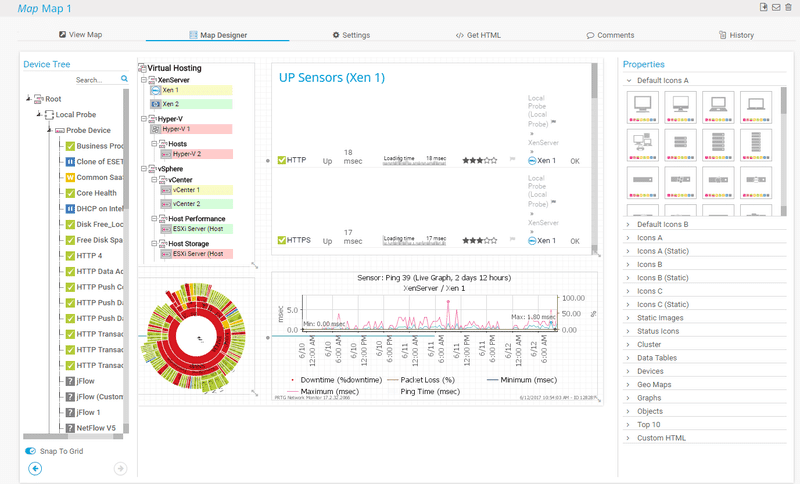
Paessler PRTG Network Monitor is an all in one monitoring tool that easily keeps an eye on all of your Lan Infrastructure. There tool is an excellent choice for anyone that wants to see how they can monitor their existing equipment on the network, and there is even a free version of the software that gives users a maximum of 100 sensors to work with.
Key Features:
- Dynamic integrated solution
- Advanced alert system
- Capacity planning tools
The software itself enables users to monitor critical services such as mail server monitoring (specific service monitoring for web, mail, database and virtual servers), and gives you full control 24 hours a day.
Why do we recommend it?
Paessler PRTG is recommended for its all-in-one monitoring capability, supporting diverse LAN infrastructure needs effectively.
PRTG operates in three main ways. Firstly, as an integrated solution. This means that it can adapt dynamically to the environment that you operate in. So whether you are downsizing or up-scaling, PRTG can help you to keep an eye on things such as server CPU temperatures and fan speeds, CPU and memory usage, hard disk space and much more.
There is automated switch and router failure functionality as well, so if a vital piece of your network starts to malfunction, you will be the first to know about it. Even your virtual infrastructure is taken care of, so VMs are always being watched.
The next area that PRTG makes things easier for users is with its alert system. There is email and SMS functionality so that if a server starts to misbehave, or generate errors, then the appropriate member of your team will be notified immediately, even if they are away from the office.
This is especially useful for starting the troubleshooting process, as the alerts will generally be able to point you and your team in the right direction as to what the cause of the outage could have been.
The third way that PRTG is able to help is with capacity planning. By monitoring your current usage stats on your local servers and infrastructure, PRTG is able to help you identify where your company needs to start investing in greater capacity and capability.
Charts, graphs and data are all available via the dashboard, so when it comes time to present your case to the financial director, you will have all of the information that you need to state your case effectively for a budget approval.
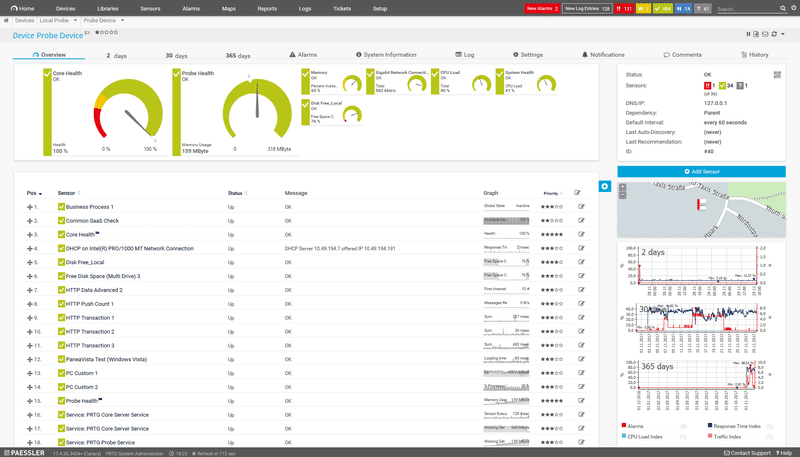
PRTG is a great tool for monitoring your network, and keeping an eye on the operational aspect of the environment as a whole. The free version is an excellent testing tool for anyone looking to improve the way in which they support their LAN with monitoring and reporting tools.
Who is it recommended for?
This tool is suitable for those seeking comprehensive LAN monitoring, from small-scale operations to large enterprises.
Pros:
- Drag and drop editor makes it easy to build custom views and reports
- Supports a wide range of alert mediums such as SMS, email, and third-party integrations into platforms like Slack
- Supports a freeware version
Cons:
- Is a very comprehensive platform with many features and moving parts that require time to learn
Pricing is free for 100 sensors, and starts at $1,600 per 500 sensors in the paid version. You can start with a 30-day free trial to work out the requirements of your network.
3. Site24x7 – FREE TRIAL
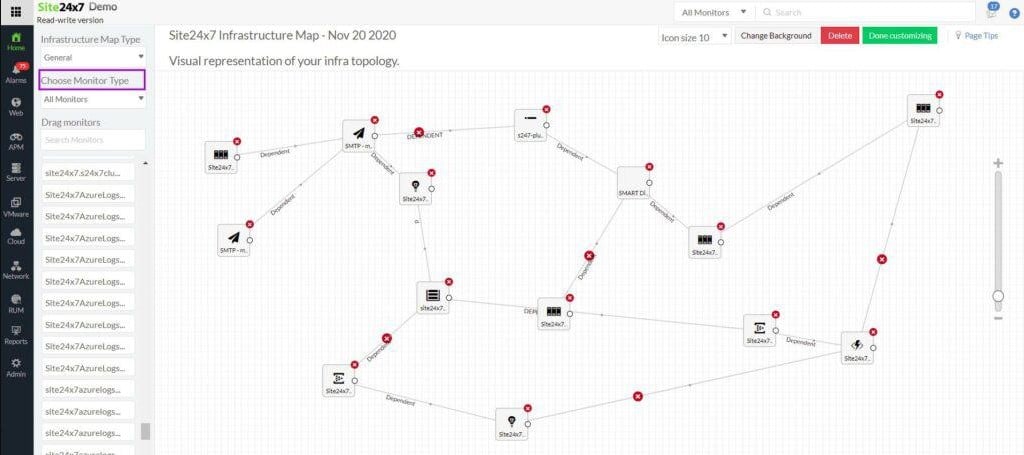
Site24x7 treats LAN monitoring as one layer inside a wider observability system, which changes how network data is interpreted. Instead of isolating device status from the rest of the environment, it correlates LAN behavior with application activity, endpoint performance, and external connectivity. That context allows administrators to see whether a network issue is local or driven by something outside the LAN boundary.
Key Features:
- Autodiscovery with continuous refresh
- Network device monitoring through SNMP
- Traffic analysis using flow technologies
- Alerting with notification forwarding
The platform establishes its monitoring scope through continuous discovery. It identifies devices, builds an inventory, and generates a topology map automatically, but unlike one-time scans, this process repeats. The result is a network model that evolves with the infrastructure instead of drifting out of date. That model is used alongside monitoring data, so topology and performance are always aligned.
Device monitoring relies on SNMP, but it does not stop at polling. SNMP traps are ingested and converted into alerts, which are then distributed through email and SMS. Additional protocols such as WMI and ICMP extend coverage, ensuring that devices without uniform configurations are still visible. This layered approach avoids blind spots that can appear in heterogeneous networks.
Why do we recommend it?
Site24x7 is worth recommending because it combines traffic behavior with device health instead of treating them as separate monitoring streams. Flow standards such as NetFlow, sFlow, and J-Flow are used to measure throughput and capacity, while SNMP tracks device condition. That makes it easier for administrators to distinguish between hardware faults and traffic saturation, which often look similar when viewed in isolation. Because the data is retained, engineers can also compare live conditions with historical patterns and identify recurring load problems.
The collector deployed during onboarding becomes the main gathering point for operational data. It retrieves device metrics, traffic flow records, application activity, and endpoint performance, then forwards that information to the hosted platform. As a result, the LAN is monitored as part of a wider operational system rather than as a stand-alone environment.
The service also reflects the fact that LAN monitoring rarely ends at wired infrastructure. Wireless segments, virtual systems, and cloud-connected resources are all included in scope, which reduces the blind spots that appear when traffic moves beyond the local network.
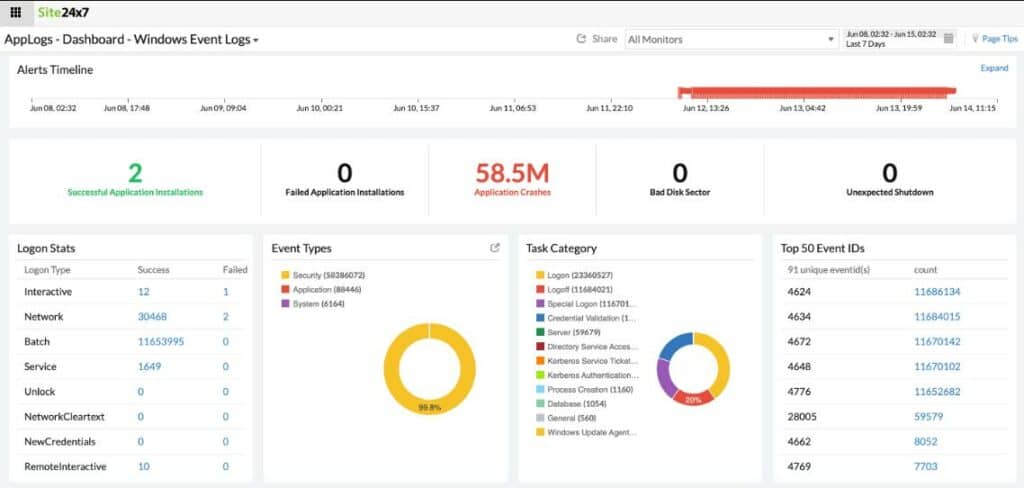
Configuration management and logging extend the package beyond observation alone. Device settings can be standardized, protected from unauthorized changes, and aligned with topology-based access strategies. Logs can be aggregated, correlated with SNMP data, and forwarded to a SIEM, adding a security and compliance layer to network monitoring.
The console is flexible rather than fixed. Dashboards, alerts, and reports can be reshaped around operational priorities, which allows the monitoring layer to adapt as the infrastructure changes.
Connection testing tools add an active layer as well. Links can be tested continuously, availability checks can trigger alerts, and scripted walkthroughs can validate web interactions. That shifts the package beyond passive observation and into active verification of service availability.
Who is it recommended for?
The platform is suitable for organizations that do not want LAN monitoring isolated from the rest of their infrastructure visibility. Because all modules are available across plans and only capacity changes, it can scale from small deployments to larger environments without changing the monitoring model.
Pros:
- Adaptive dashboards, reports, and alert conditions
- Built-in configuration management
- Integrated log management
- Cloud-hosted access model
Cons:
- No on-premises deployment option
Pricing is structured around capacity rather than feature sets. The Infrastructure Monitoring edition starts at $9 per month, with higher tiers required as network size increases. The platform can be evaluated through a 30-day free trial.
4. ManageEngine OpManager Nexus – FREE TRIAL

ManageEngine OpManager Nexus, formerly OpManager Plus, can monitor more than 10,000 device types across 450 vendors to cover almost any device in your LAN. This comprehensive coverage makes OpManager Nexus ideal for any environment.
Key Features:
- Proactive bandwidth monitoring and flow analysis to identify traffic patterns.
- Advanced configuration tracking and control.
- Alerting through multiple channels.
- Insightful reports for proactive monitoring
Why do we recommend it?
The extensive coverage offered by this platform makes it a good choice for LAN monitoring. It can gather and analyze more than 200 metrics related to device performance, CPU usage, and memory to provide deep insights into the performance of all devices in your network. You can even use this information to proactively troubleshoot issues before they disrupt operations. It can be helpful for capacity planning as well.
OpManager Nexus is well-known for its intuitive dashboards, where all the information is displayed on a single pane, and in a way that makes it easy for the viewers to understand. If required, you can further drill down into the metrics to identify the root cause of issues.
It goes beyond device monitoring and also includes bandwidth and flow analysis. This combination provides information about unbalanced resource consumption and the presence of rogue devices in your network. Flow analysis can particularly come in handy to identify anomalous traffic patterns, so you can investigate their root cause and fix them at the earliest.
Another feature we like is the advanced tracking and control over system configurations. Its change tracking helps identify which users changed a configuration and when, so you can identify insider threats. It will also provide a trail of activities for auditing and compliance.

Who is it recommended for?
It is recommended for system administrators, network engineers, and MSPs who are responsible for the smooth running of LANs.
Pros:
- Sends alerts across multiple channels.
- Generates insightful reports
- Monitors firewalls.
Cons:
- The features can be extensive for small businesses.
OpManager Nexus is priced at $1,233 for the Professional edition and $19,995 for the Enterprise edition. Start a 30-day free trial.
5. SolarWinds Network Performance Monitor
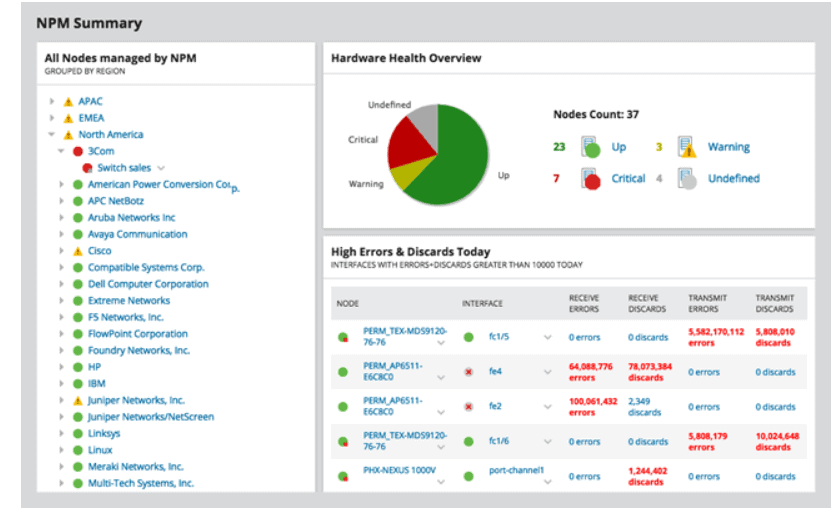
SolarWinds Network Performance Monitor is a great tool for businesses that need to enhance their IT department’s monitoring capabilities. This product has excellent capabilities and is acts as both a monitoring tool and a troubleshooting utility. The entire system is accessible via a clean and intuitive web interface.
Key Features:
- Automated network discovery
- Intuitive web interface
- Customizable monitoring
- Extensive virtual machine tracking
Why do we recommend it?
SolarWinds Network Performance Monitor is recommended for its superior network discovery and monitoring capabilities, complemented by an intuitive and customizable interface.
Installing the software is easier than ever, and thanks to the inclusion of an online installer, users are ensured of the latest version of the installation software whenever they choose to load it onto their monitoring server.
The entire process is guided and automated, and all that is needed are the login credentials for your Active Directory server, VMWare administration details and the specific IP address ranges that you wish to scan. Once all of this information has been entered in, the application goes ahead and performs all of the network discovery tasks on its own.
Once all of the devices have been discovered, users can customize which elements they want to keep tracking, and can discard unwanted devices from the monitoring list. Users may find that they are overwhelmed by a barrage of information in the beginning, but with careful refinement and setup, any unwanted information can be easily discarded, and the key details of your environment will take on a more visible position in the web console.
Virtual Machines can be monitored easily, as well as their system resource consumption and activity all the way down to the host’s hardware level. Information such as Network Transmissions, CPU and Memory utilization are all visible on an easy to read graph.
Network activity is dissected into graphs and data, and can tell administrators exactly what activity is happening on the network. Network performance such as latency, Network/Bandwidth throughput and speed is all visible from a single point, making it easy and convenient for viewing.
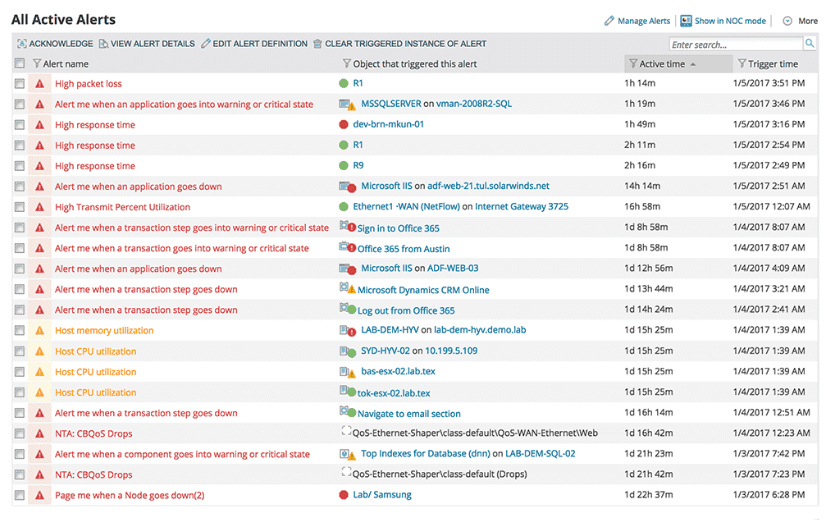
All of these features combined creates an easy to use application that adds value and visibility to the network, and provides essential monitoring tools for IT professionals that need to monitor both big and small networks.
Who is it recommended for?
It's ideal for IT professionals in businesses of all sizes needing comprehensive network monitoring and troubleshooting tools.
Pros:
- Supports auto-discovery that builds network topology maps and inventory lists in real-time based on devices that enter the network
- Has some of the best alerting features that balance effectiveness with ease of use
- Supports both SNMP monitoring as well as packet analysis, giving you more control over monitoring than similar tools
- Uses drag and drop widgets to customize the look and feel of the dashboard
- Tons of preconfigured templates, reports, and dashboard views
Cons:
- This is a feature-rich enterprise tool designed for sysadmin, non-technical users may some features overwhelming
You can start with a 30-day free trial.
Conclusion
Being in control of your LAN Environment means more than just having the tools to fix things when they go down. In order to truly understand the current state of your environment, you need to have full monitoring and reporting tools at your disposal. Whenever a key application fails, or a critical server crashes, or a vital service on a server fails, your company will inevitably start to lose money.
The time that you and your team spend fixing problems could be more effectively used with other work, which means that your company loses out on more productivity, which incurs additional monetary losses for your department, and for the company.
Monitoring your LAN is the only way to catch problems before they become massive issues, and when you are in control of your network, you are able to anticipate, plan for, and mitigate any issue that could come your way, both with your servers, and your network infrastructure as a whole.
Once your LAN Monitoring Software is in place, you can say goodbye to intermittent server and network appliance outages, and Hello to a more productive and efficient IT department. We suggest you try one (or All) of the Tools listed above and let us know how it goes!
LAN Monitoring Software FAQs
What are some common tools used for LAN monitoring?
Some common tools used for LAN monitoring include Wireshark, SolarWinds Network Performance Monitor, and PRTG Network Monitor.
How can organizations ensure that they are monitoring their LAN in real-time?
Organizations can ensure that they are monitoring their LAN in real-time by using automated monitoring tools and setting up alerts to notify administrators of potential issues or security threats.
What are some common types of network traffic that should be monitored?
Common types of network traffic that should be monitored include HTTP, HTTPS, FTP, SMTP, and DNS traffic.
How can organizations use LAN monitoring to optimize network performance?
Organizations can use LAN monitoring to identify potential bottlenecks or issues that are affecting network performance, and take proactive measures to address these issues before they become major problems.
Can LAN monitoring help organizations to improve network security?
Yes, effective LAN monitoring can help organizations to identify potential security threats in real-time, allowing them to take proactive measures to protect their network and prevent data breaches.
What are some common challenges associated with LAN monitoring?
Common challenges associated with LAN monitoring include the complexity of modern IT environments, the sheer volume of network traffic, and the need to balance security with business needs.
Related Post: Best Bandwidth Monitoring Tools