
Being able to measure the time between hops of your network is really important, especially if you are responsible for ensuring uptime and network performance as part of your daily system admin roles.
Here is our list of the best TraceRoute alternatives:


- VisualRoute Lite – Best for home users and small networks needing free graphical traceroute
- PingPlotter – Best for IT pros requiring continuous monitoring and alerting
- SolarWinds TraceRoute NG – Best for network engineers wanting free continuous path monitoring
- CountryTraceRoute – Best for quick Windows-based traceroute with country lookup
- NetScanTools Basic – Best for technicians needing a free multi-tool diagnostics bundle
- HyperTrace – Best for basic users seeking simple GUI traceroute with logging
Tracert is a command line tool that lets you measure the path that your packets are taking over the network, and can tell you how long each hop takes.
If you experience a network outage, Tracert can help you to determine how far the data packet is traveling, and at which IP address, or hop, it is failing at.
Some of these include the same commands and more on top of the basic list of them, along with some cool mapping features and more!
The Best TraceRoute Alternatives
What should you look for in a TraceRoute alternative?
We reviewed the market for TraceRoute replacements and analyzed options based on the following criteria:
- A consecutive list of the routers on the path to a location
- Options for network path detection and internet routes
- The roundtrip time to each router in the path
- Nice to have a real-world map showing the route over the internet
- A topology map showing the route across the network
- A free trial for a risk-free assessment opportunity or a free tool
- Value from a tool that offers competent services at a fair price or a free tool that is worth installing
With these selection criteria in mind, we looked for a range of systems from highly complex network and cloud monitoring systems to simple visual equivalents of a quick TraceRoute run.
1. Site24x7 – FREE TRIAL

Site24x7 is a hosted platform of monitoring and management tools that includes three different TraceRoute-style functions. One of those options, the TraceRoute to your domain tool, can be used free of charge without signing in. It displays the results in the site, and the same trace can be viewed by anyone else with access to the page. Tests can be launched from a long list of locations worldwide.
Unique Feature
Site24x7 provides path tracing for both internal networks and internet routes. One of its utilities lets you view the route from many global locations rather than from only one source point.
Why do we recommend it?
Site24x7 is worth recommending because its tracing tools sit inside a much larger troubleshooting and monitoring package. The TraceRoute-style functions are well presented visually, which makes connection paths easier to interpret across both local infrastructure and the public internet.
The paid section of the service includes two additional tracing utilities. One is based on My Traceroute, or MTR, and shows both the actual path and the best recently observed path in a graphical layout. Another option sits inside the Website Monitoring module and can be called on demand through the Real User Monitoring tools. That makes it useful when a visitor reports slow responses or failed connections and support staff need a fast path analysis from the service itself.

Who is it recommended for?
Site24x7 is not just a troubleshooting toolkit, because most of the platform is built around automated monitoring and management. The plans can suit organizations of different sizes, from small businesses to much larger operations, and the automation reduces the time technicians need to spend on routine network administration.
Pros:
- Includes traceroute within a wider network monitoring platform
- Proactive alerting for network problems
- Provides live monitoring and historical analysis for troubleshooting
- Supports customizable dashboards for clearer visibility
- Checks site availability from multiple locations
Cons:
- Not every TraceRoute-style utility is free
While the domain TraceRoute test is free, the other tracing utilities are included in the paid plans. You can get a 30-day free trial of the full platform.
EDITOR'S CHOICE
Site24x7 is our top pick for a TraceRoute alternative because it delivers a broader diagnostic package than a traditional hop-by-hop tracing tool. It does more than show the path traffic takes, adding live monitoring, historical analysis, and visual reporting that provide far more context during troubleshooting. Instead of limiting administrators to a simple list of hops, the platform also tracks network health, latency, packet loss, and bandwidth, which helps teams understand why a route is performing badly rather than only where it goes. Customizable alerts add early warning for issues such as rising latency or packet loss, and the service can test routes from multiple geographic locations to show whether a problem is local, regional, or global in scope.
Download: Access 30-day FREE Trial
Official Site: https://www.site24x7.com/signup.html?pack=44&l=en
OS: Cloud-based
2. ManageEngine OpManager – FREE TRIAL
The second tool on our list is ManageEngine OpManager. This is a comprehensive network monitoring platform that comes with a traceroute tool to monitor the connectivity between devices. Specifically, it traces the transmission path to identify network latency or packet loss issues along the path. As a part of this analysis, it can also identify the faulty configurations that could result in a total packet loss.

Why do we recommend it?
Traceroute analysis is a simple operation, but when done well, it can offer tons of insights about your networks and their metrics. You can use this tool to identify the shortest and most efficient path from source to destination. Also, it helps identify network latency, packet loss, and other connectivity issues, and their root cause, so you can fix them right away.
OpManager is an advanced tool that traces every step along the path to provide accurate information at different parts of the transmission. Such detailed data can help with capacity planning and forecasting as well.
Another advantage is its comprehensive reporting capabilities. It can generate reports on metrics, performance, usage, and more. Lastly, it integrates well with most devices, making it ideal for any environment.

Who is it recommended for?
This tool is a good choice for MSPs, IT engineers, and network admins who need greater visibility into their network connectivity.
Pros:
- Efficient troubleshooting – OpManager will run a thorough traceroute action from the source to the destination, and will gather the required metrics needed for troubleshooting.
- Response times – Monitors the response times to identify the root cause of the problem.
- Reports – Generates a wide range of reports for informed decision-making.
- Underperforming devices – Identifies all the underperforming devices on your network.
Cons:
- Limited OS: Works only on Windows and Linux devices.
OpManager starts at $95 per year for 10 devices and two users. Start a 30-day free trial.
3. Path Analyzer Pro
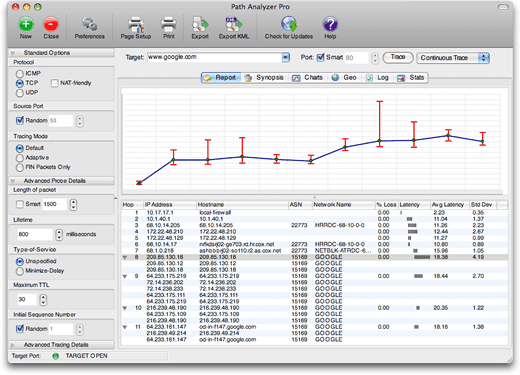
Next, we have Path Analyzer Pro. This is an advanced network tool that can obviously run traceroute, but has additional functionality with its performance testing, DNS queries, whois, and network resolution.
Why do we recommend it?
Helps to investigate network issues with its advanced network route-tracing capabilities. It also offers performance tests, DNS, whois, and network resolution.
This all helps to investigate network issues and connectivity problems on the network. All of these features are rolled up into a single powerful application that makes it far easier for system admins to use.
It runs on both Windows and Mac OS, so you can map out the current state of your network, regardless of what type of environment you are trying to troubleshoot from. Other great features are things like performance improvements over traditional tracerout, with over 20 times the speed.
It has built-in report generation and a very easy-to-use interface. The charting option brings a visual component that helps with fault finding, which is great as well.
Who is it recommended for?
A good choice for network administrators who want to optimize their work environments and speed up data transfers.
Pros:
- Available for Mac and Windows
- Can detect network drops, latency, and jitter, making it a solid option for troubleshooting VoIP networks
- Features simple network graphing
Cons:
- Clunky – especially around the protocol and tracing mode options
- Reporting lacks customization options and isn’t as user-friendly as some of the competing tools
Anyone wishing to try out Path Analyzer Pro can download the trial from here. Pricing starts at $29.95 for the personal version and goes up to $89.95 for the business version.
4. VisualRoute Lite
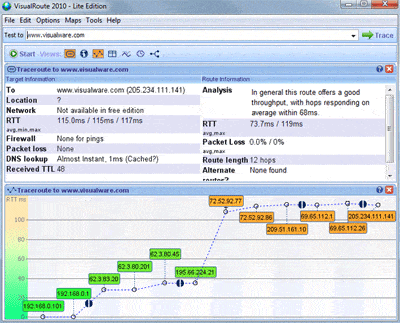
VisualRoute Lite is a free program for home users, and is intended primarily as an internet connection diagnostic. This is because it uses hops between routers on your internet connection’s path to the internet. If a particular piece of equipment, or path is giving issues, then users are able to track the new path, or point of failure via the software.
Why do we recommend it?
It provides a detailed connectivity analysis, including continuous testing, application port testing, and more. It also generates real-time and historical reports.
Even if your connection is working, but slow you can get valuable latency information from the user interface. There is both a Windows version, as well as a Mac OS version available for users, so you can use it on the device that suits you best. Other valuable info includes a route information analysis, packet loss data, DNS lookup information and response times, a visual graph, and information about alternate routes. Overall, this is a very basic application, but because it is aimed at home users it doesn’t need to have many other features other than the ones we have looked at here.
Who is it recommended for?
This tool works well for anyone who wants to analyze connectivity issues between a client and a server to better understand network issues.
Pros:
- Highly visual tool
- Supports both Mac and Windows
- Displays routes, response times, and network health
Cons:
- Free version is not designed for business usage
VisualRoute Lite is free for home use.
5. PingPlotter
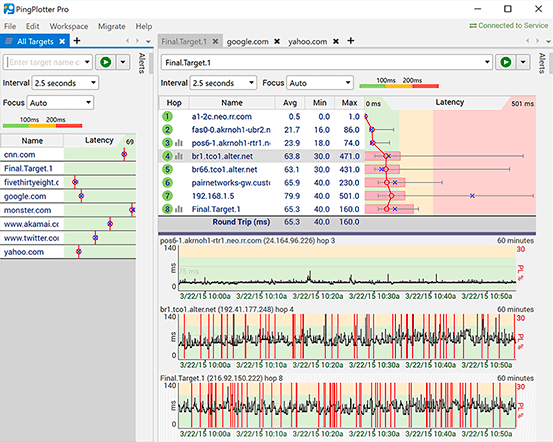
PingPlotter is another good application for network troubleshooting and route mapping for your network traffic. It helps you to detect and inspect the route and issues relating to speed with alerts and conditions, which is quite useful for Network monitoring purposes.
Why do we recommend it?
PingPlotter identifies the source of connection problems, and more importantly, helps to prove it to the concerned stakeholders. It can come in handy for network troubleshooting as well.
You can set up conditions that start logging as soon as routing issues become apparent so that you can record any deviations from normal operating procedures over your network. There are visual tools such as graphs as well, which help with visualization and understanding problems much easier.
There is a standard and pro version of this application, with the standard features focusing more on small businesses and home users, while the pro version is more geared towards larger organizations with enterprise requirements.
Who is it recommended for?
It works well for any individual who wants to identify the cause of a network problem.
Pros:
- Three options including a freeware version
- Offers lightweight visualization into latency across devices
- Good for both one-off tests as well as continuous testing
Cons:
- Could benefit from a longer trial period
- TCP and UDP tests are not included in the free version
The pricing is set at $39.99 for the Standard edition and $199.95 for the Professional edition.
6. SolarWinds TraceRouteNG

SolarWinds Tracert NG is a great free tool for your network that can help you with performance measuring and path changes on your network. It allows for continuous probing when troubleshooting connectivity issues, so you can monitor changes to any fault while you continue investigating a fault.
Unique Feature
Provides accurate path analysis and visibility. Plus, it's standalone and free.
Why do we recommend it?
This tool is adept at finding network paths and measuring their performance. In the process, it can quickly identify response-time issues.
Traceroute NG is especially useful in the network path analysis segment of your network because it can easily monitor both TCP and ICMP. It stores log files in the form of TXT logfiles and can support IPV4 and IPV6, ensuring that your diagnostics are future-proof.
Overall, SolarWinds Traceroute NG is a basic tool that offers great functionality in a simple package. It does exactly what it says, and provides valuable diagnostic information in times of network issues, giving you a better understanding of where your network might have failed.
Who is it recommended for?
Ideal for network administrators who want to understand network issues like delays, dropped packets, router problems, and more.
Pros:
- Lightweight tool allows you to run it on virtually any network off of any machine
- Supports both IPv4 and IPv6, making it flexible or larger networks utilizing more modern protocols
- Acts as a troubleshooting tool to detect packet loss, jitter, and latency
- Offers simple visual representations of network traffic
- Is completely free
Cons:
- Advanced features such as enterprise reporting are supported but can be found in products like SolarWinds Network Performance Monitor
SolarWinds Tracert NG is 100% FREE. If you think that it might be useful in your network setup, why not try downloading it here?
7. CountryTraceRoute by Nirsoft.com
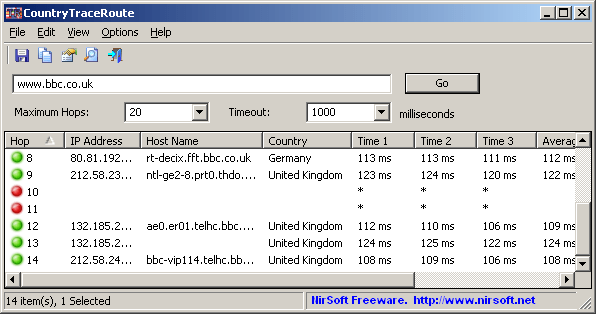
CountryTraceRoute is another traceroute utility that uses a graphical user interface instead of the old-style, command line interface that many system admins are familiar with. It uses a window that shows valuable information such as the IP address of each hop, the host name, country that the IP address resides in, the time of each hop, and the total hops to the destination.
Why do we recommend it?
This tool is much faster than Tracert and also comes with a GUI. Plus, it also displays the country of the owner of every IP address.
The only thing that this app is lacking is a map overlay, but that may or may not matter to you. Perhaps the best feature of this application is the fact that it runs much faster than traditional traceroute applications, which is a big plus if you are troubleshooting in a hurry.
The next great thing about this application is the fact that it is completely free to use. This means no trials, no sign-ups, and no credit card details required.
Who is it recommended for?
CountryTraceRoute is a good choice for any individual who wants to do traceroute operations to know the route and the transit delay of packets.
Pros:
- Extremely lightweight scanning tool
- Older interface, but it does the job
- Provides a better verbose look into traceroutes than the command line interface
Cons:
- Lacks reporting capabilities
- Not good for long-term monitoring
CountryTraceRoute is FREE.
8. NetScanTools Basic
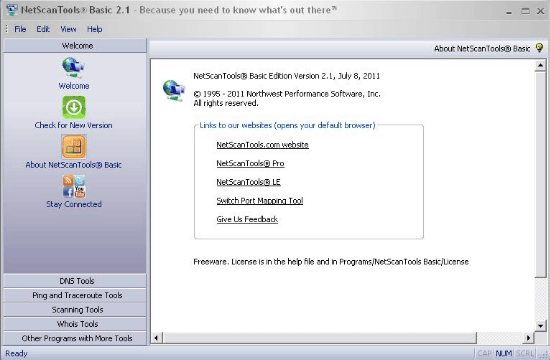
NetScanTools Basic is a freeware tool that runs in Windows and has compatibility with Windows 10, Windows 8, Windows 8.1, Windows 7, Windows Vista, Windows XP, Server 2016, Server 2012, Server 2008, and Server 2003.
Why do we recommend it?
A suite of tools that include Ping, traceroute, whois, ping scan, DNS tools, and more. This makes it a one-stop tool for your basic network diagnostics.
It comes with additional tools as well as the traceroute application, and it allows users to perform Ping, Ping Scan, Graphical Ping, Traceroute, and Whois operations. This is handy as it all resides in a single application, and commands are easy to execute from within the application.
Again, as with many of the freeware applications, some people might not find exactly what they are looking for with this application as it lacks some of the basic functionality such as a global map. Although it does have some graphical output in the form of graphs and visual hops, it doesn’t seem to have much in the way of report generation and export. This means that this application might be more suitable for a home user than for a professional environment.
Who is it recommended for?
Ideal for network engineers or for anyone who wants to test their network connection.
Pros:
- Can run whois, DNS lookups, and simple queries with a simple push of a button
- User-friendly, even for non-technical users
- Supports hostname resolution
Cons:
- Interface feels unnecessarily crowded at times
- Lacks visualization capabilities
- Available only for Windows
NetScanTools Basic is a freeware tool.
9. HyperTrace by AnalogX
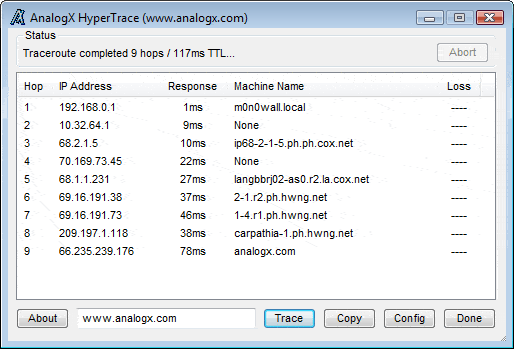
If you have ever been stuck with connectivity options but wanted to know where the break in connectivity resides, then HyperTrace can help. It performs basic Traceroute operations via an easy-to-use graphical interface.
Why do we recommend it?
Displays the route taken by packets as they move from one machine to another on the Internet. Its GUI is highly helpful to trace the packets.
It allows you to visually inspect the route that your data packets are taking over the internet and provides valuable insight into the current state of your internet connection. It is compatible with all versions of Microsoft Windows, and best of all, it is free to use.
This is very basic as far as Traceroute tools go, but that may or may not be a good thing, depending on the requirements that you may have for using traceroute and similar network utilities within your environment.
You can safely open this application without having to worry about it draining valuable system resources, as it has a very minimalistic memory footprint, due to the simplistic interface and light resource requirements.
Who is it recommended for?
A good choice for network engineers as it is fast and efficient in identifying the traceroute.
Pros:
- Lightweight traceroute tool
- Easy to use – very intuitive
- Can store and export results
Cons:
- Fairly barebones – power users may require more features
HyperTrace by AnalogX is a freeware tool.
Conclusion
Traceroute is an invaluable diagnostic tool to have in your bag of tricks, especially if you are a network technician or system administrator.
Being able to quickly visualize where the break in connectivity resides on your network, or over the internet, is greatly important.
Finding the right application for your environment is important, especially if you have specific requirements, such as reporting, mapping, and visually showing your managers exactly what is happening on your network at any given time.
TraceRoute Alternatives FAQs
Why might I need an alternative to Traceroute?
There are several reasons why you might need an alternative to Traceroute, including:
- Traceroute may not work with certain network configurations or firewalls
- Traceroute may not be available or installed on all operating systems
- Traceroute may not provide the level of detail or accuracy you need for your network diagnostics.
What are some popular alternatives to Traceroute?
Some popular alternatives to Traceroute include:
- SolarWinds TraceRouteNG
- MTR (My Traceroute)
- WinMTR
- PingPlotter
- tcptraceroute
What information can I gather from hop analysis?
Hop analysis can provide information about several aspects of network performance, including:
- Network topology and routing paths
- Latency and packet loss at each hop along the path
- Bandwidth and throughput of each network device along the path
- Network errors and anomalies, such as dropped packets or high levels of retransmission.
How can I troubleshoot hop analysis errors?
To troubleshoot hop analysis errors, you can try the following:
- Verify that your network configuration and routing paths are correct and up-to-date
- Check for network congestion or bandwidth limitations that may be affecting network performance
- Try adjusting network device settings or configurations to see if this improves performance
- Use additional network diagnostic tools, such as packet sniffers or network performance monitoring tools, to identify specific issues with network traffic or devices