IPFIX is making its own waves in more recent times when it comes to network packet collection, aggregation, and analysis, as one of netFlow's main competitors. One of the biggest and most obvious advantages of IPFIX is that it's more open-ended and vendor-friendly than netFlow tends to be.
Here is our list of the best IPFIX Collectors:


- Plixer Scrutinizer – Best for large networks pairing flow analysis with SIEM.
- IsarFlow – Best for high-traffic networks needing custom IPFIX and SNMP insights.
- SolarWinds Bandwidth Analyzer Pack – Best for Windows teams spotting bandwidth hogs in real time.
- FlowViewer – Best for SMBs wanting a free open-source flow collector.
IPFIX essentially helps level the playing field a bit without requiring each vendor to tailor-make their own pseudo-netFlow, or worry about potential infringement or other claims from Cisco for NetFlow use – though, to their credit, Cisco has been fairly hands-off thus far with regards to the realm of NetFlow.
IPFIX also allows for a wide selection of non-vendor-specific data to be collected as well, which can even be proprietary, the availability of which could sometimes be downright critical!
Nonetheless, a vendor-agnostic option is something that almost always comes about in the world of IT, and IPFIX is just the next iteration of what may become the new norm for Flow traffic analysis and collection!
Thankfully, there's already a wide range of software, from open-source and free to paid enterprise level, that will assist you in performing just that very task – snatching up all the IPFIX data it can find and presenting you with all the wonderful analytics you've come to expect from NetFlow, and more!
The Best IPFIX Flow Analysis, Collection & Monitoring Tools
Our methodology for selecting IPFIX collectors and software
We reviewed various IPFIX collectors and analyzed the options based on the following criteria:
- Support for various flow types
- Reporting or auditing capabilities
- Support for alerts and notifications
- A facility to analyze network flow analysis over time
- Graphical interpretation of data, such as charts and graphs
- A free trial period, a demo, or a money-back guarantee for no-risk assessment
- A good price that reflects value for money when compared to the functions offered
Grab one of these software packages below and start collecting data from your network devices today. Most have free Downloads and are easily installed on Windows systems and some are even compatible on Linux.
1. ManageEngine NetFlow Analyzer – FREE TRIAL
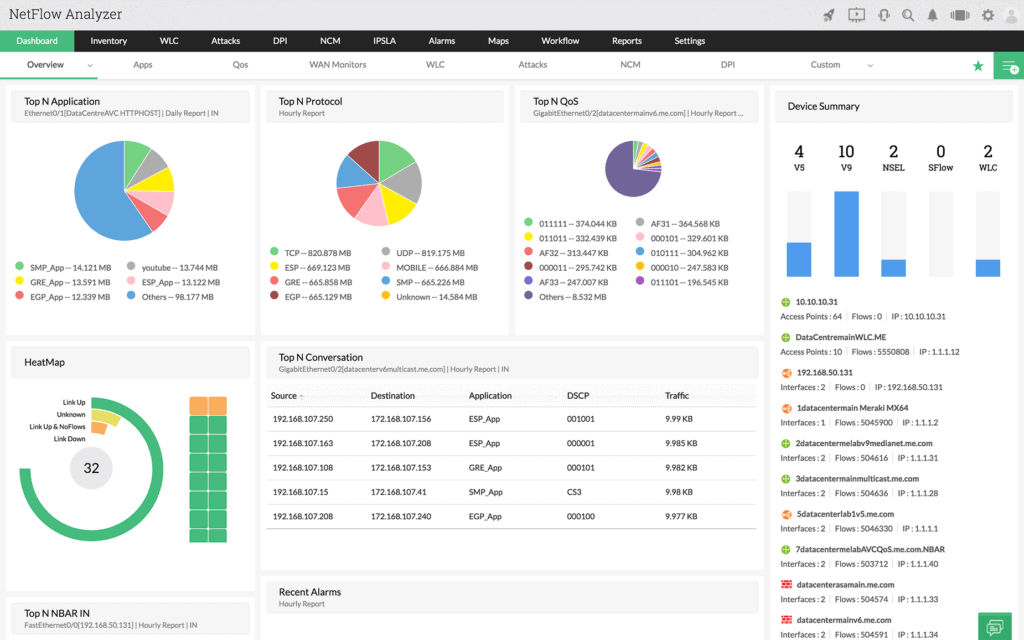
ManageEngine NetFlow Analyzer is a great tool to get insights in flow technologies and help you see real-time what's going on in your networks.
Feature Distinction
This is a web-based tool that we can access from anywhere. It also supports many flow technologies for greater extensibility.
Why do we recommend it?
NetFlow Analyzer is a comprehensive tool that monitors our bandwidth and analyzes traffic to identify potential issues. It also creates forensic reports and manages compliance with existing security standards.
This tool collects, analyzes and reports information on network usage, bandwidth, resources and many other details that a network monitoring system is not capable of doing.
Flow protocols are used to analyze every packet going through your routers and switches to ensure nothing malicious is within your perimeter and helps ensure high availability and throughput of your network devices.
Who is it recommended for?
A unified tool for organizations that use different flow technologies and platforms.
Pros:
- Supports multiple protocols like NetFlow, great for monitoring Cisco equipment
- Both tools work well alongside each other to help view traffic patterns and bandwidth usage
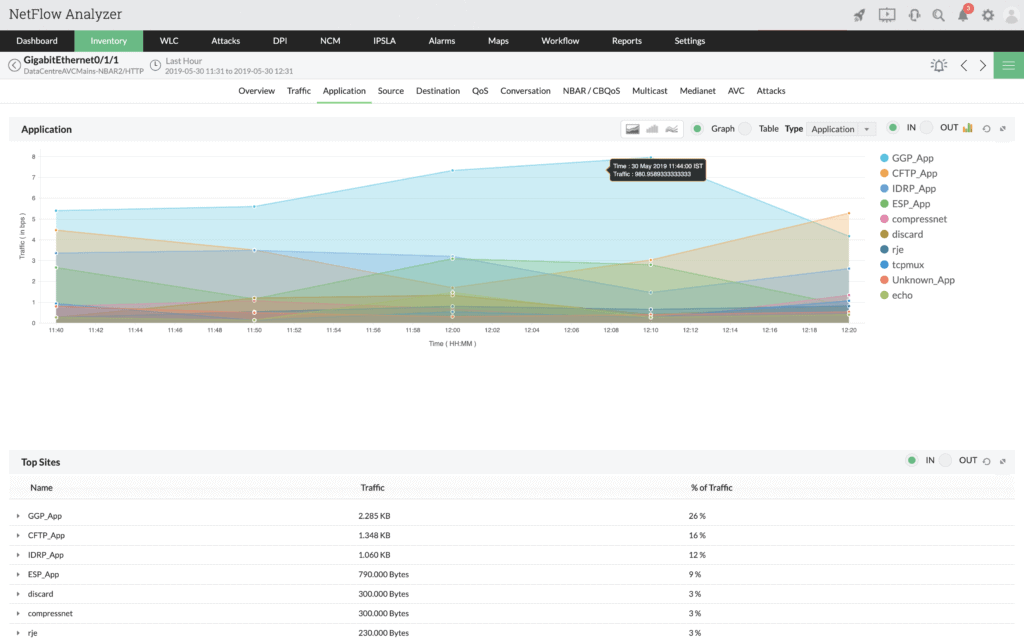
- Easy-to-use interface automatically highlights bandwidth hogs and other network traffic outliers
- Scale well, designed for large enterprise networks
- Can view traffic on a per-hop basis, allowing for granular traffic analysis
Cons:
- Built for enterprise use, not designed for small home networks
Start a 30-day free trial.
EDITOR'S CHOICE
ManageEngine NetFlow Analyzer is our top pick for an IPFIX collector and analyzer for flow analysis because it combines wide flow-protocol support with detailed traffic visibility. By working with IPFIX, NetFlow, sFlow, and related standards, it can fit complex or changing network environments without locking teams into one format. The platform captures granular traffic data that helps administrators identify bottlenecks, inefficiencies, and suspicious behavior, while live monitoring, historical reporting, and detailed dashboards make that data easier to use for troubleshooting and optimization. Visibility into application traffic, user activity, and device behavior adds further depth, and support for multi-vendor environments helps the platform stay practical as networks expand.
Download: Download a 30-day FREE Trial
Official Site: https://www.manageengine.com/products/netflow/download.html
OS: Windows Server, Linux, and AWS
2. Site24x7 – FREE TRIAL

Site24x7 provides solid IPFIX collection and analysis for teams that need live traffic visibility from a hosted platform. It works with IPFIX as well as other flow standards such as NetFlow and sFlow, allowing administrators to capture detailed information about bandwidth use, application activity, and traffic behavior.

The service helps organizations identify bottlenecks, optimize resource use, and detect anomalies through real-time monitoring, customizable dashboards, and reporting. Historical analysis adds a longer-term view, and integration with the wider Site24x7 monitoring platform gives administrators more context than a stand-alone traffic collector would provide.
Pros:
- Supports IPFIX, NetFlow, sFlow, and other flow protocols
- Provides real-time traffic monitoring
- Stores historical data for analysis
- Suitable for small and large networks
- Integrates with wider monitoring and management tools
Cons:
- No on-premises version
Access a 30-day free trial.
3. nProbe
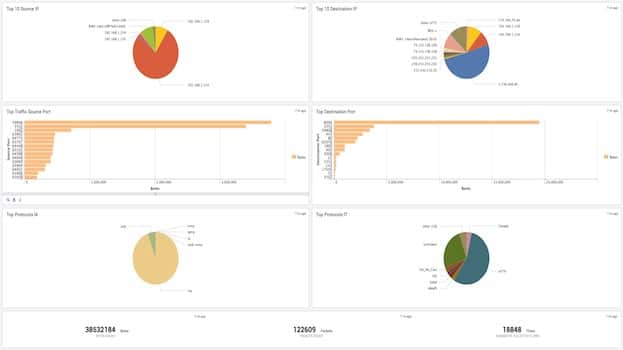
nProbe is essentially an alternate version of ntop, an already well-known and highly-used application in the realm of NetFlow.
Why do we recommend it?
nProbe can collect and analyze traffic reports from the IPFIX format. It also generates reports that can be exported to other devices for further processing. nProbe offers all the same ability and functionality with the ability to handle NetFlow v5, v9, and IPFIX all in one program.
It's perfect for larger networks that may have a mix of hardware or different monitoring environments, or for bringing older deprecated or legacy network environments up to speed while saving some time and money. It can function as collector and probe alike, giving it a great deal of flexibility, and boasts a remarkable ability to operate even on high-traffic networks with very little, if any, packet loss – something that often plagues flow collection without specific tools in place to counteract it.

Price: Roughly $55-337 depending on specific license and needs, and current exchange rate (nProbe is priced in Euros).
Who is it recommended for?
A good choice for organizations running multiple operating systems like Windows, BSD, macOS, and Linux.
Pros:
- Open source tool, highly customizable
- Supports multiple flow protocols
- Great option for Unix/MacOS
- Free options for education and non-profit organizations
Cons:
- Has a steep learning curve, especially for non-technical users
Check which version corresponds to your needs.
4. Plixer Scrutinizer
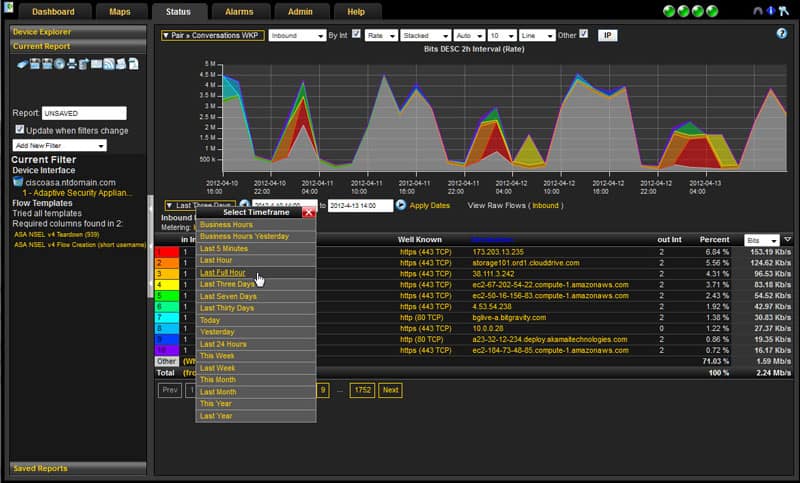
Plixar's offering is a pretty powerful and robust one – it may not look terrible beautiful in terms of the interface's graphic design, but the information is there, and the newer versions make it look a lot more snazzy and slick. Graphic design choices aside, it's a powerful program that pairs beautifully with their appliance offerings – which come in both hardware and VMWare versions.
Why do we recommend it?
A highlight of this tool is that it not only collects and analyzes information but also provides a context to help you correlate better. It also exports syslog events.
With the addition of the appliances Plixar's Scrutinizer can handle over 150k flows per second from over a thousand devices, while the VMWare version can even handle 40k flows per second and a thousand devices, give or take.
Considering that most purely software-based flow programs are relatively limited in how much they can collect and how fast, the appliance offerings are all but required for high-traffic or large network environments.

Who is it recommended for?
Ideal for organizations with different flow technologies. In particular, it can complement existing SIEM platforms.
Pros:
- Offers multiple deployment options
- Designed to support large enterprise networks
- Offers additional security-related traffic analysis features
Cons:
- Must reach out to sales for pricing
Plixar offers a great amount of scalability in this regard – their freeware version might be enough for a small environment just starting out, and over time it would be easy to buy a license, then begin gradually adding appliances bit by bit.
Limited freeware option, trials available, licenses vary heavily depending on your specific needs.
5. IsarFlow
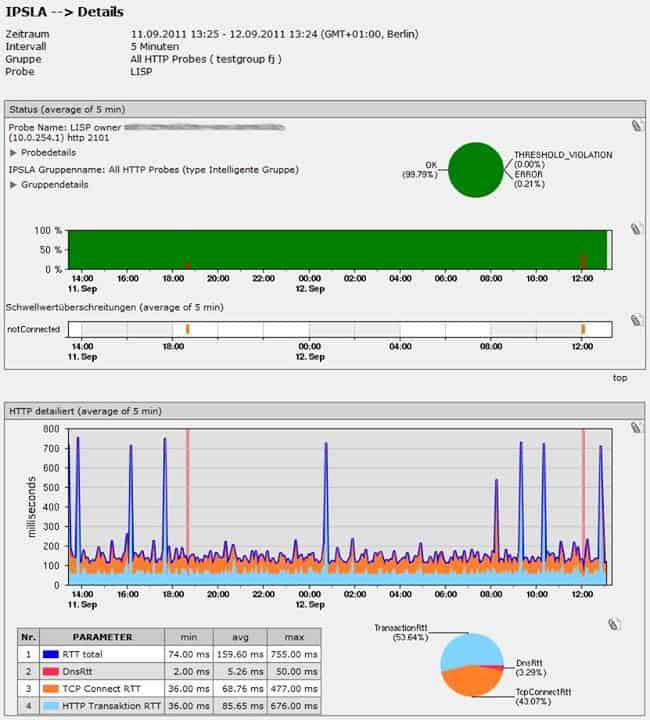
IsarFlow tries to take a personalized approach, handling each acquisition of their software license with contact in an effort to specifically tailor and customize their offering to the specific needs of your network – as such, their licensing costs vary heavily and require contact.
Why do we recommend it?
IsarFlow provides deep insights into traffic patterns to help with informed decision-making. It can also store and analyze SNMP data. It does an excellent job collecting and handling both IPFIX and NetFlow data, and SNMP for that matter.
It also facilitates heavy interface and data point customization on a per-admin basis, making it an excellent choice for individuals working together on different aspects of a network environment with individualized needs.
Who is it recommended for?
Works well in organizations with high traffic, as it's optimized to handle the highest possible rates of traffic.
Pros:
- Can deploy as a simple appliance
- Uses IPFIX and SNMP for data collection
- Can gather performance stats and QoS data
Cons:
- Better suited for small to medium-sized businesses
See their download page.
5. SolarWinds Bandwidth Analyzer Pack
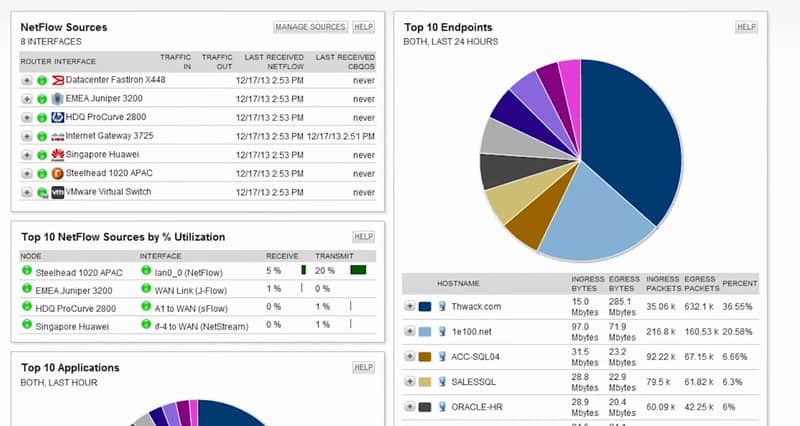
SolarWinds' Bandwidth Analyzer is part of a larger package, which also includes their Network Performance Monitor – a rather powerful fool for general network traffic analysis, system management regarding up/down time, ping, etc. – but for the topic at hand, it's the Traffic Analyzer we're concerned with.
Why do we recommend it?
This tool provides us with real-time visibility to help us better understand the performance of our bandwidth. Armed with this information, we can quickly identify the potential bottlenecks.
It handles IPFIX collection and analysis as well as NetFlow, jFlow, sFlow, NetStream, and several others. The analyzer focuses on a user-based approach which can track granularity down to a single minute for heavy traffic as well as store and display a variety of graphs and charts useful as much for diagnostics as analytics.
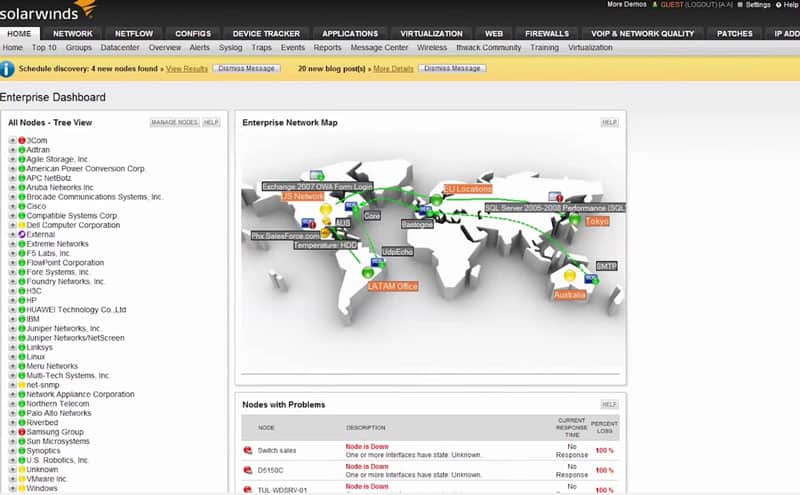
The emphasis here comes in the form of the powerful and intuitive user interface and the ability to easily manipulate and view a wide variety of information from Flow data.
Who is it recommended for?
Ideal for organizations of all sizes.
Pros:
- Great interface that balances visualizations and key insights well
- Highly customizable reports, dashboards, and monitoring tools
- Uses simple QoS rules for quick traffic shaping
Cons:
- Is a highly specialized suite of tools designed for network professionals, not designed for non-technical users
Start a 30-day free trial download.
7. FlowViewer
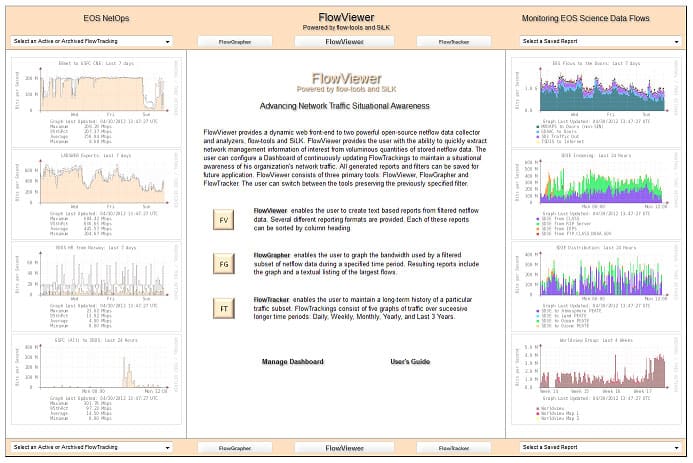
FlowViewer is really more of a front-end than a stand-alone offering, acting as a web-based interface for the eponymous duo of flow-tools and SiLK. Due to the combination of these two aspects in particular it can handle IPv6 and Cisco v9 NetFlow as well as a full range of IPFIX!
Why do we recommend it?
It captures and analyzes NetFlow data to provide in-depth insights into your network. It even comes with a web-based interface for easy access.
Due to being open-source, and quite popular, it's also pretty darn robust especially given the total lack of up front cost. It has a slick interface, especially for being web-based, and provides a full range of graphing and visual representation of data while still providing all the mundane, rote line-by-line flow tables you could want.

As far as basic analysis goes at no cost, there's not much better out there!
Who is it recommended for?
This free tool is ideal for small and medium organizations.
Pros:
- Completely open source and transparent project
- Simple native graphical reporting
- Supports IPv6 and Cisco v9
- Completely free
Cons:
- Lacks some more advanced reporting and filtering capabilities
This package is free and open-source.
Conclusion
NetFlow and IPFIX are, in a roundabout way, kinda sorta the same thing.
This would be a pretty obvious thing to those familiar with each, as they know that IPFIX is directly derived from the NetFlow v9 RFC, and at least one individual who worked on NetFlow v9 also worked on the IPFIX RFCs as well!
Generally speaking they kinda do the same thing, but there's some definite nuances – IPFIX makes a few nitpicky sorts of adjustments to some terminology and labeling, but generally is just a bit more expansive and refined than NetFlow and offers some bits of customization and modularity, to a degree.. unless, of course, we take into account Flexible NetFlow, but that's neither here nor there.
Proper monitoring and gathering of information for thorough diagnostics and analysis is critical for maintaining a robust and healthy network environment. Continuous tracking of traffic tendencies can help enormously in preventing downtime and provide remarkable foresight in regards to future scaling needs.
More importantly though IPFIX, much like its NetFlow counterpart, offers a wide berth more than just basic data, and can let you dig down into the most granular aspect and tidbit about the packets traversing your network that there's simply almost no problem too sneaky and small for it to help you ferret out!
Add to that the flexibility of being able to customize some of the IPFIX fields and you've got a powerful option that can even be tailor-fit to your needs.
Grab one of the Listed IPFIX Collector and Analyzers from above and take back your network bandwidth by finding high bandwidth users and more.
IPFIX Collectors and Analyzers FAQs
What is an IPFIX collector?
An IPFIX (Internet Protocol Flow Information Export) collector is a tool that collects flow data from IPFIX-enabled devices on a network. It processes and stores this data for analysis and reporting, providing network administrators with insights into network traffic and performance.
What is flow data?
Flow data is a collection of information about network traffic, including the source and destination IP addresses, the protocol and port numbers, and other metadata. Flow data can be used to identify patterns in network traffic, monitor network performance, and detect security threats.
How does an IPFIX collector work?
An IPFIX collector receives flow data from IPFIX-enabled devices on a network, such as routers, switches, and firewalls. The collector then processes and aggregates this data, storing it in a database for analysis and reporting. Administrators can use the collector to generate reports on network traffic, identify anomalies or security threats, and troubleshoot performance issues.
What are some benefits of using an IPFIX collector?
Some benefits of using an IPFIX collector include improved visibility into network traffic and performance, enhanced network security, and better troubleshooting and performance analysis. By collecting and analyzing flow data, administrators can gain insights into network usage patterns, identify security threats, and optimize network performance.
What are some popular IPFIX collectors?
There are several popular IPFIX collectors available, including open-source tools like nProbe, pmacct, and SoftFlowd, as well as commercial tools like SolarWinds NetFlow Traffic Analyzer, Cisco Stealthwatch, and Plixer Scrutinizer.